
Mini - Minecraft (C++, OpenGL, GLSL)
* UPenn policy restricts public sharing of source code, so the repository isn’t included here, but the descriptions below outline my implementation and technical decisions.


A group project to build a simplified Minecraft-style game from scratch, without using a game engine. The project implements a procedural voxel-based world rendered using OpenGL and custom GLSL shaders.
Responsibilities were divided among team members. My contributions are outlined in sections below.
In addition, I was responsible for the landscape’s art direction. By owning the procedural terrain pipeline, I tuned noise functions and biome thresholds to control terrain composition, biome ratios, and overall visual cohesion.
Written in Qt Creator
Languages: C++, OpenGL, GLSL
Contributions:
1) ★ Procedural Terrain and environment:
-
All procedural terrain generation with biomes (grassy hills with sand - bordered waters + lakes, mountain peaks with snow, underwater kelp forest, caves with lava)
-
Procedural asset placement for flowers, tall grass
-
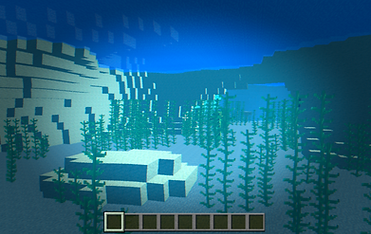
Underwater biome with procedural placed kelp forest and coral
* I was responsible for everything that is explicitly mentioned in all contribution sections


The procedural terrain generation used layered noise functions (FBM-layered Perlin and Worley noise, both 2D and 3D noise). The noise results were then put through a height clamp that adhered to biome rules, with y-values being height in vertical voxels. Blocks were placed according to the biome and height they existed at. For example, snow blocks only appears above a certain height in the mountain biome. These values had to be carefully balanced to create a cohesive and well-balanced terrain.
in addition, biome transitions were dictated by another noise mask, which uses a smoothstep with two values (0.4, 0.6) that adjusts the range in which values fall into a certain biome. For example, with 0.4 and 0.6, anything below 0.4 is one biome, anything above 0.6 is another, and between 0.4 and 0.6 the two biomes lerp (start mixing). If this range is shrunk to 0.45 and 0.55, the transitions between biomes will be more abrupt and more of the terrain will be decidedly one biome or another (not mixed).
Procedural placement of surface details such as flowers and tall grass was driven by additional FBM-Perlin noise layers combined with biome - and context-specific rules. For example, flowers could only spawn on grass blocks within certain height ranges, or increased weed growth around trees, which all helps the terrain feel more organic and less uniformly distributed.
The underwater biome was procedurally filled with size-varying kelp and coral, which needed their own additional checks aside from noise (only placing kelp when said kelp will have enough overhead water, and only placing corals if their branches won't intersect with kelp to avoid weird mesh clashes).



2) ★ Post-process camera effects and animation:
-
Water and lava surface vertex animation
-
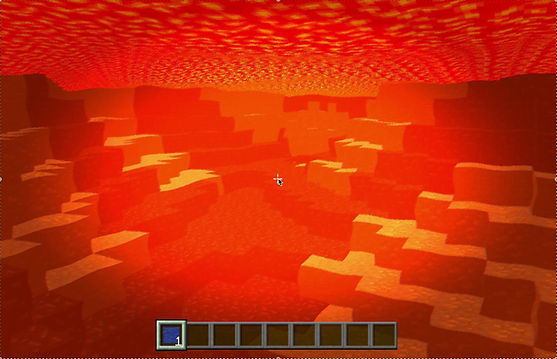
Water and lava post-processing camera overlay effects (underwater and underlava effects)
Created custom vertex and fragment shaders using OpenGL / GLSL pipelines for water and lava. Vertex animation to the water/lava surface was added in the vertex shader using sin waves (in two different directions to create a "overlapping waves" look) with regards to time.
In addition, when camera is in water or lava there are these following post process effects, which are tweaked as needed to fit either water or lava: animated wave distortion using sine waves + noise, chromatic aberration (offsetting red and blue slightly for underwater/underlava distortion effect), color tinting, and vignette (darkening screen edges using radial distance from center)
* The parameters for the water and lava versions of vertex and fragment shaders are different to reflect the difference between water and lava (for example, tighter and smaller wave distortions underlava than underwater)
** "is water" and "is lava" detection uses the color given by sampling the original colors from frame buffer


3) ★ Additional quality-of-life:
-
Distance fog & sky color
-
Crosshair HUD overlap
-
Clouds


Created the distance fog by calculating the distance to camera using length(fs_Pos.xyz - u_CameraPos), which gives distance from camera position to the current fragment's world position, then lerped between the fragment's color and the fog color (light blue) with the alpha being distance value that this fragment is within the "fog range". The resulting lerped color is output as our out_Col.rgb.
The crosshair was custom-made in Photoshop, and was applied using a 2D texture sampling method, so that the pixels that are at the screen center always sample from the UV of the crosshair image.
Clouds were made from FBM-Perlin noise, with parameters scaled so only small pieces of cloud come through (having threshold be something higher/less common).
Debrief:


Most interesting bugs:
- Problem: The underwater kelp had a weird blue gap running down the middle, plus random blue pixels showing up on and around the kelp
- Solution:
For transparent assets like kelp and flowers (which use crossed planes to fake volume), we use alpha thresholding - basically, if a pixel’s alpha is below some cutoff, we treat it as fully transparent.
When I started digging into it, the behavior didn’t really feel like a shader or logic bug. Instead, it pointed to the texture itself. Some pixels that were supposed to be transparent actually had tiny amounts of color leaking into them, which made them pass the alpha threshold and get rendered as opaque. At the same time, pixels along the center of the kelp weren’t opaque enough, so they were getting culled and creating that visible gap.
Once I took the texture tiles into Photoshop, cleaned up the stray color on pixels that should be transparent, and boosted the opacity in the center, the blue artifacts and the gap disappeared.
It was interesting/satisfying because the path to the solution came from a combination between both knowledge of the texture tiles (which I made and edited in Photoshop), and knowledge of our culling logic.
- Problem: Top layer of water not rendering when there is a block directly above it, making it look like empiness.
- Solution:
This issue showed up after I added vertex animation (the up-and-down wave motion) to the water and lava surfaces. When the liquids were static, the surfaces stayed flush with neighboring blocks, so the bug was effectively hidden.
While playtesting, I used our block-removal mechanic on the offending area and confirmed there was a water block there - its top face just wasn’t rendering.
The root cause was our face-culling rule for transparent blocks: we only render faces that are adjacent to EMPTY blocks. With oscillating liquids that breaks under overhangs, a water block can still be visually exposed (due to the animated surface) even when there’s a solid block directly above it.
So, I found that the issue was our current logic: transparent blocks only render faces adjacent to EMPTY blocks. It works fine for the large pieces of water/lava surfaces out in the open, but we needed a special case when we have oscillating liquids to also render the top face of water if there's a solid block above it. So the check becomes "when the block we are on is WATER/LAVA and it's a TOP FACE and its upstairs neighbor is NOT TRANSPARENT, the face must be drawn". This way the water/lava surface under the "overhang" is also rendered.
Next steps:
- More procedural biomes (cherry grove, jungle, flat plains, or even a "city" using Manhattan-influenced Worley noise)
- More assets with directed asset placement (like flower patches on flat plains, pockets of tall grass, etc), and more underwater assets like corals, small grass, and underwater rocks
- More movement (moving clouds, slightly rustling grass/flowers/trees)
- NPCs like chicken and sheep
- Adding sounds (footsteps, block breaking, block building, swimming, biome-specific sounds, etc)